How can we help?
Short guides for everything that comes up in a day with Dog Walkers. Just start typing and we'll show you matching answers. And if you get stuck, a real person is here for you.
- Response time1–2 business days
- In the appMore → Help & support
- System statusdogwalks.cogswell-it.com/v1/health
Getting started
From download to your first walk. Most people are ready to go in a few minutes.
How do I set up my business?
After installing, the app walks you through the essentials. You can change everything later:
- Open More → Business details, prices & templates and enter your name, address, tax ID and bank details. They appear on your invoices and contracts.
- In the same place, set your walk prices, the second-dog surcharge and your pick-up and drop-off service. Packages and subscriptions live under Online package booking.
- Check More → Settings → Notifications to make sure notifications are allowed. Otherwise no walk reminders will reach you.
Good to know: your business address is also the starting point when the app later works out the best order for your tours.
Can I try everything with sample data first?
Absolutely. Under More → Membership switch on Admin demo (everything unlocked). You'll see sample customers with dogs, walks and invoices, and every feature is unlocked.
Important: the demo replaces your current data with the sample data. So it's best to try it before you add real customers, or to create a backup first. When you're done, tidy up with More → Settings → Data & backup → Delete all data. Your business details are kept.
How do I add my first customers?
In the Customers tab, tap + at the top right. You have two options:
- Create manually: you enter the contact and dog yourself.
- Invite by email: you only type the email address. Your customers fill in contact, dog and health details online and sign digitally. Once they're done, tap Fetch data now in the customer profile and the file is complete.
Invitations run through the customer portal, so you need a server account and at least the Pro plan.
How many customers can I add?
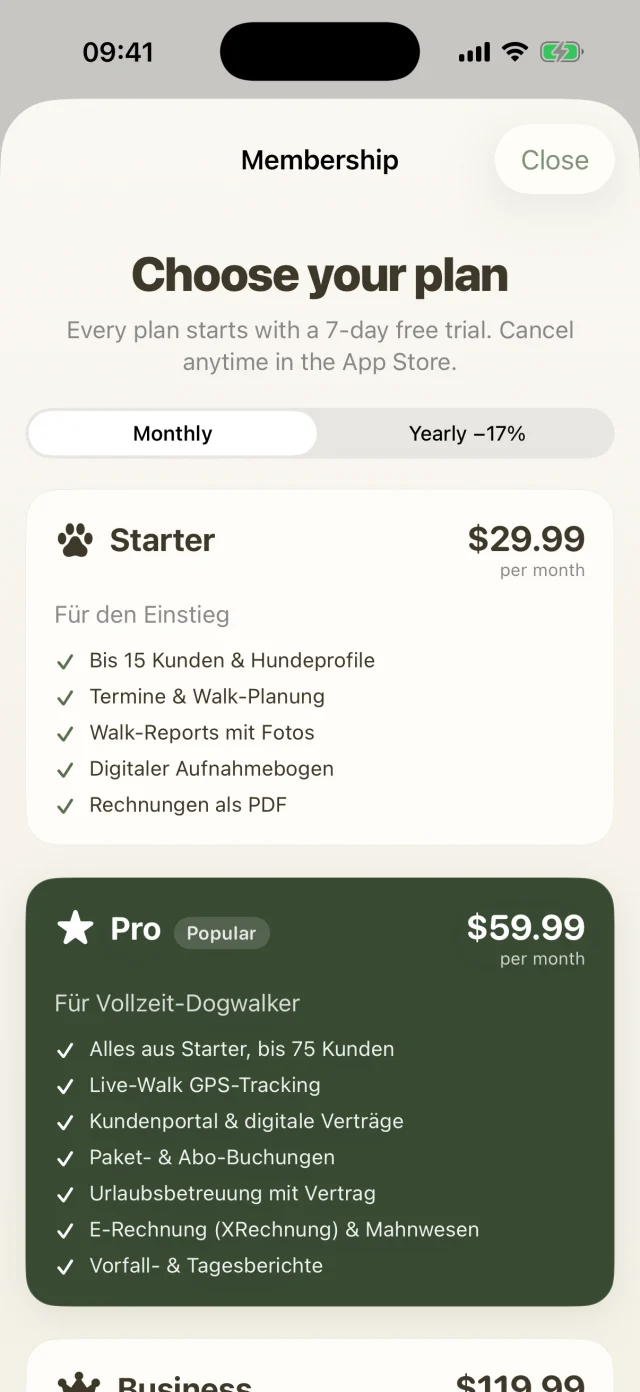
Up to 15 on Starter, up to 75 on Pro and as many as you like on Business. When your pack grows, just switch plans. All your data stays exactly where it is.
I don't get any reminders. What can I do?
Go to More → Settings → Notifications to see the status. If it says Disabled in iOS, tap through to the iOS settings and allow notifications.
Then switch each reminder on or off: the walk reminder (30 minutes, 1 or 2 hours before), boarding arrivals (24 hours before) and departures (at 8 am on the departure day).
Which languages is Dog Walkers available in?
German, English (US, UK, Australia), French (France, Canada), Dutch, Swedish and Danish.
The app follows your iPhone's language. To use Dog Walkers in a different language, change it under iOS Settings → Dog Walkers → Language. Dates, numbers, units and weather follow your region, so in the US you get miles and degrees Fahrenheit, for example.
How do I set my currency?
- Open More → Business details, prices & templates and pick your Currency in the invoices section: EUR, USD, CAD, GBP, AUD or CHF. Your iPhone's region currency is preselected.
- Prices, invoices, contracts and the customer portal use the chosen currency from then on. Existing invoices stay unchanged.
- Number formatting (comma, point, thousands separator) follows your iPhone's locale.
The German e-invoice format (XRechnung) is only available for businesses in Germany using euros.
Which widgets are there?
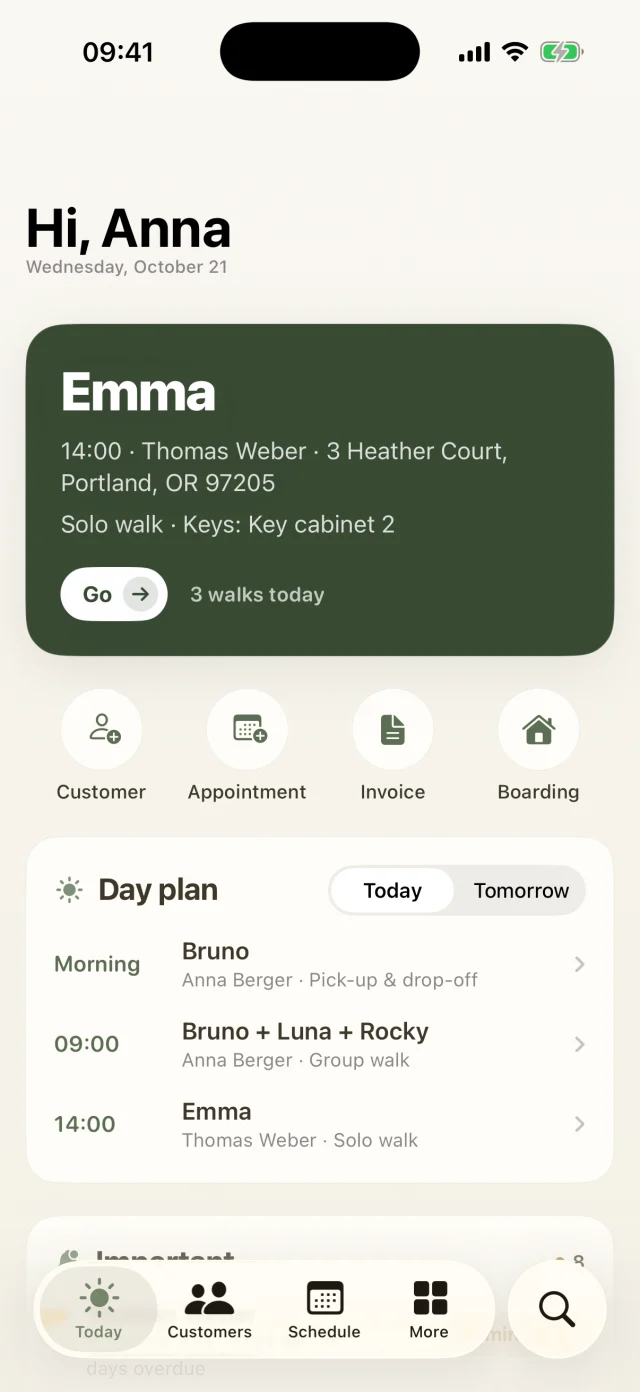
- Next walk for the Home Screen (small and medium): the next dog with time, customer and your progress for the day.
- Walks today for the Lock Screen: how many walks are on today and how many are done.
To add one, long-press an empty spot on your Home Screen or Lock Screen, tap Edit or Customize and search for Dog Walkers. Tapping the widget takes you straight to your Today screen.
What can I ask Siri?
- “Who's on today in Dog Walkers?” Siri tells you how many walks are on today, how many are done and who's next.
- “Next walk in Dog Walkers” tells you the next open walk.
- “Start a walk with Dog Walkers” opens the app and starts a live walk. Available from Pro.
- “New appointment in Dog Walkers” opens the Schedule tab so you can get going right away.
You'll also find all of them in the Shortcuts app, where you can combine them with your own automations.
Is Dog Walkers available for Android?
Right now Dog Walkers is available for iPhone and iPad. We're working on an Android version. Your customers don't need an app at all, by the way: the customer portal and the live link work in any browser.
Clients & dogs
Customer files, dog profiles, the customer portal and contracts. Everything you need to know about your dog people.
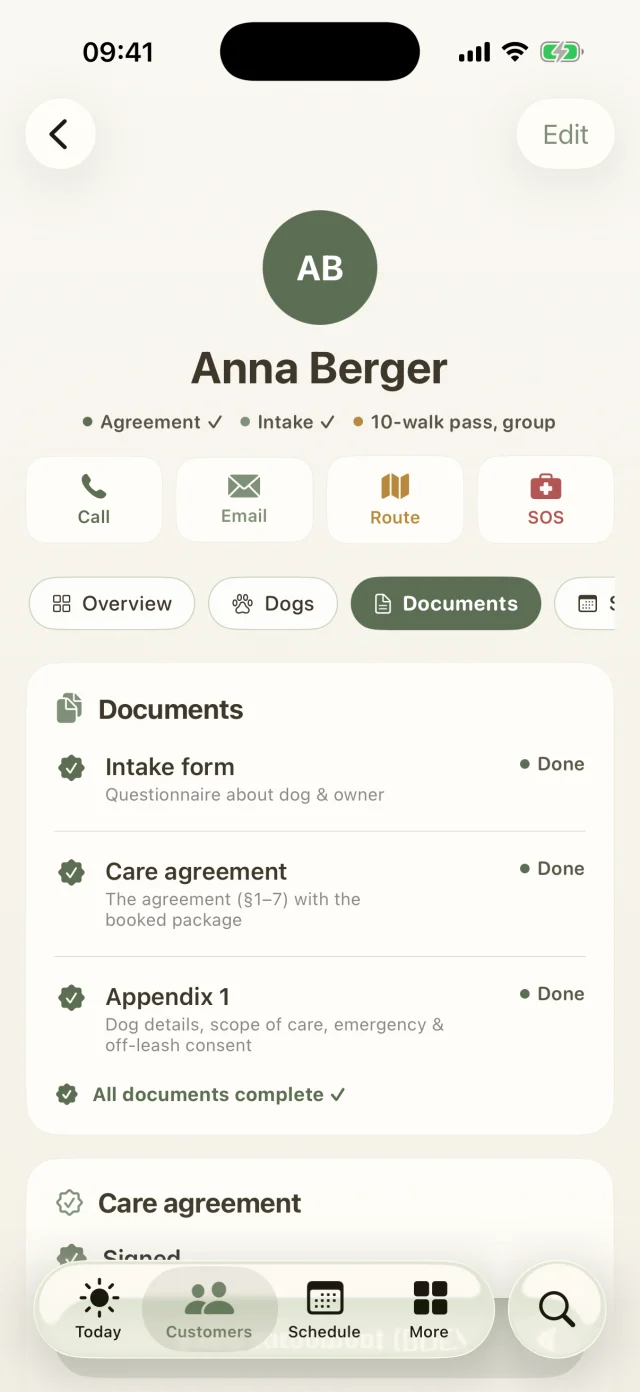
What's in a customer file?
For every customer you keep contact details, address, emergency contact, vet, insurance, package, prices and the complete message history. For every dog there's breed, age, birthday, weight, microchip number, food, allergies, medication, photos and a training log.
Vaccinations get a date. The app shows you what's due soon or overdue and reminds you on the Today screen.
What does the SOS button do?
In the customer profile, SOS shows allergies and medication in large type. You can call the vet, the emergency contact and the owner straight from there, and you see your GPS location to pass on. If something happens, everything is on one screen.
What is the collar QR code for?
Every dog gets its own QR code that you can share or print and attach to the collar or lead. Scan it in the app and the right customer profile opens instantly, with contact and emergency info.
How do I send the intake form? Pro and up
- In the customer profile, open the Documents tab and tap Email intake form. Your customer gets a personal link, no login needed.
- There they enter contact, dog, health, medication and habits and sign with a finger.
- The status bar in the profile shows whether the form has been filled in. If something changes (new phone number, new medication), use Send again (refresh data). The form comes pre-filled.
How do customers book their package online? Pro and up
- In the customer profile under Package & pricing, tap Send package selection link (portal).
- Your customer picks a package, weekdays, time slots and pick-up service and signs online. The price is calculated automatically, including the second-dog discount.
- You decide which packages to offer under More → Business details, prices & templates → Online package booking.
How do I get the contract signed? Pro and up
Every customer file has three documents: the intake form, the care agreement and appendix 1 with dog details, scope of care and consents. The customer list shows progress from 0/3 to 3/3.
- Open Documents in the customer profile and send the agreement. Your customer signs online with a finger.
- The signature then appears automatically in the profile and in the agreement PDF, which you can share or file.
- Sitting together right now? Your customer can simply sign on your iPhone.
The contract is already signed on paper. What do I do?
Open Documents in the customer profile and tap Already on paper on that document. Once all three documents are done, progress in the customer list jumps to 3/3.
Can I customise the contract text and my emails?
Yes. Under More → Business details, prices & templates you'll find the contract template (PDF) and the email templates. Placeholders for the customer, the dog or your business name are filled in automatically. Leave a field empty and the app uses its standard text. Changes to the contract apply to new contracts.
How do details from the portal get into the app?
Tap Fetch data now in the customer profile. Or use More → Server account & customer portal → Sync now, which syncs both ways: forms, bookings, signatures and reviews come into the app, and your customers, appointments and invoices go to the portal.
Schedule, groups & boarding
Plan walks, build groups that get along, welcome boarding guests and drive smarter tours.
How do I plan walks?
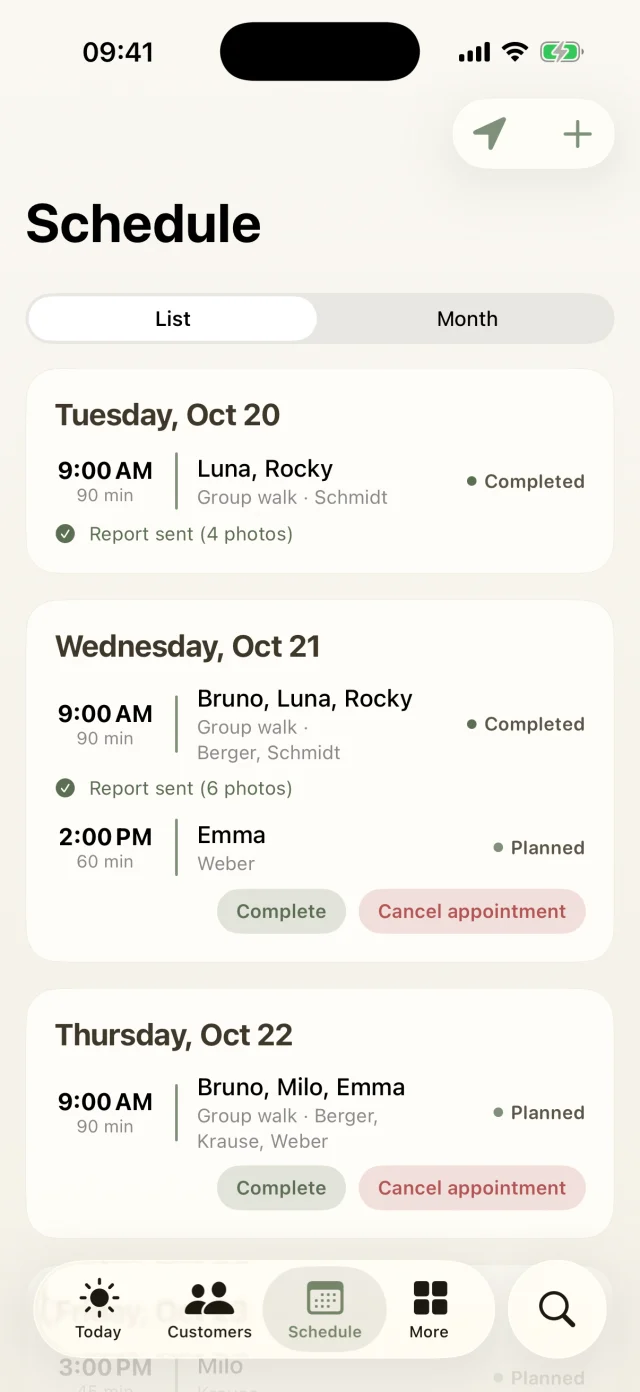
The Schedule tab shows all walks as a list or in a monthly calendar. Days with appointments are marked, and tapping an appointment opens all the details. Use + to add a new solo or group walk and pick the dogs.
Fixed subscription days from package bookings show up automatically in the day plan on your Today screen.
Can I set up recurring walks?
Yes. Create your regular groups once as a series and they appear automatically every week. No more re-entering your Monday group every Monday.
How does the app warn me when dogs don't get along?
Each dog profile has a Group section where you record:
- Doesn't get along with: pick the dogs it doesn't work with. This automatically applies both ways.
- A group note, for example “muzzle only” or “doesn't like males”.
- Via Add heat period the In heat until date, plus sex and whether the dog is spayed or neutered.
When you plan an appointment, and for boarding stays that overlap, Check group tells you if dogs don't get along, if a female in heat meets an intact male, or if the group gets too big. The app only warns you; the decision is always yours.
How many dogs fit in a group?
You decide. Under More → Business details, prices & templates set the maximum number of dogs per walk in the standard prices; the default is six. If you plan more, the app lets you know. How full your groups are over the next seven days is shown under More → Occupancy.
How do I complete or cancel a walk?
One tap completes the walk and opens the walk report right away. If you need to cancel, the app drafts the message to your customers for you. Completed walks are ticked off in the day plan and go into the next monthly invoice.
How does boarding work? Pro and up
- Under More → Boarding → + the booking takes you through six steps: customer, dogs, dates, services, special notes and summary. The booking number is assigned automatically.
- The occupancy calendar shows at a glance when you still have room. The app flags guests who don't get along during the same stay.
- Confirm and, if you like, send the agreement for the owners to sign online.
- The app reminds you the day before arrival, and the Today screen shows who's coming. At Check-in you note what was brought along and how the dog is doing.
- During the stay, a Daily report sends a sweet hello by email, so nobody on the beach has to worry.
- After Check-out, tap Complete + invoice and the invoice is created from the nights.
How do I optimise the order of my tour? Business
- Open More → Tours and pick a tour.
- Tap Optimize order. The app uses real driving times from Apple Maps, starts at your business address and ends at the last stop.
- You see before and after, with driving time and distance. Like the new order? Tap Apply.
The Map shows all stops numbered, and Start navigation opens Apple Maps to the next stop. You need internet, a business address and a street address for every customer.
Live walk & reports
Record the route, take owners along live and send a report that comes from the heart.
How do I start a live walk? Pro and up
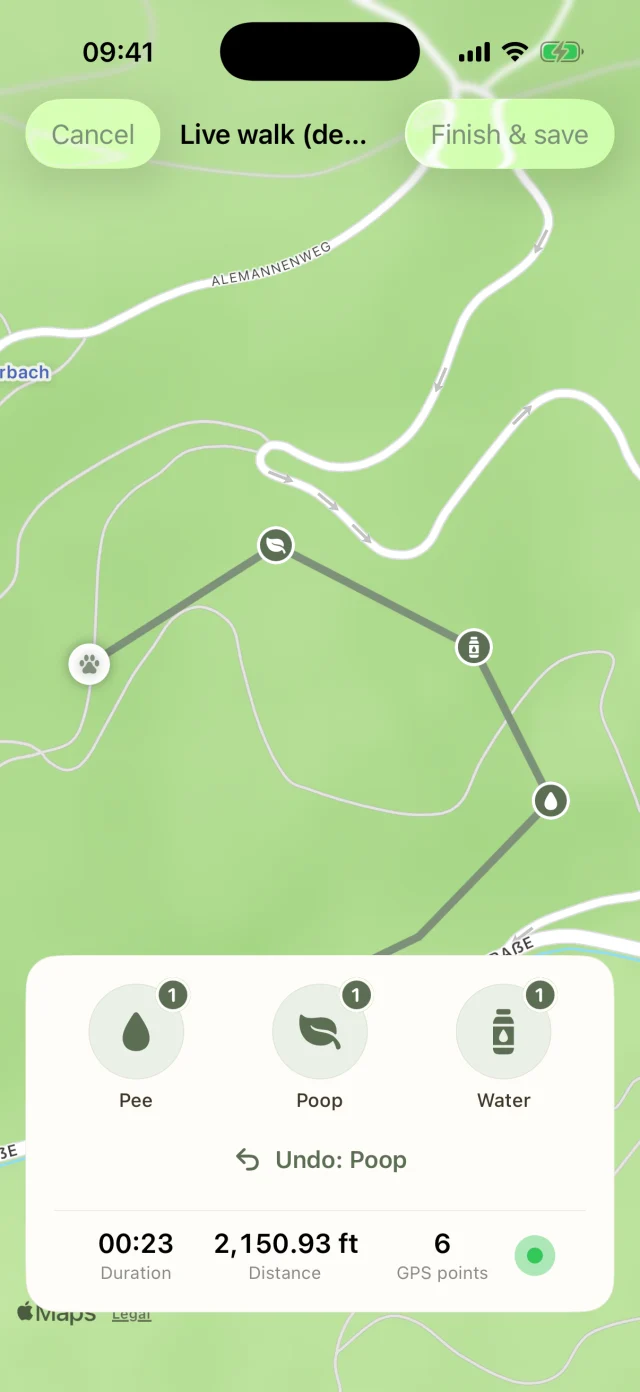
In the Schedule tab, tap Start live walk. Or just say “Start a walk with Dog Walkers” to Siri. The map shows duration, distance and the recorded route in real time.
Which location permission does the app need?
On your first live walk, iOS asks for your location. Choose While Using the App and allow Precise Location, otherwise the route will be inaccurate. Declined by accident? Change it under iOS Settings → Dog Walkers → Location.
The route is recorded while Dog Walkers is open, so it's best to keep the app in the foreground during the walk.
How do I mark pee, poop and water?
The live walk has three big buttons you can hit one-handed. Each marker lands on the map at your current position. If the appointment that's running has just one dog, the app assigns the marker automatically. For groups it briefly asks Which dog?, and you can also Skip. Tapped the wrong one? Undo takes the last marker back.
How can owners follow the walk live?
- Connect a server account first under More → Server account & customer portal. The app then creates a live link automatically when the walk starts.
- Tap Send live link to customer and send it by message or email. The text is ready to go.
- Your customers see in their browser where you are right now, markers included. They don't need an app.
As soon as you finish or discard the walk, the link goes inactive and only shows that the walk has ended.
What does the Live Activity on the Lock Screen show?
During a live walk, the Lock Screen and the Dynamic Island show the distance and the pee, poop and water counts without opening the app. After the walk, the summary stays up for 15 more minutes. Nothing showing? Check under iOS Settings → Dog Walkers that Live Activities are allowed.
What happens when I end the walk?
Finish & save keeps the walk with route, distance, duration and all markers, and the live link goes inactive. If you cancel instead, the app asks whether you want to discard the walk or keep walking. Discarding saves nothing.
How does the app write my walk report?
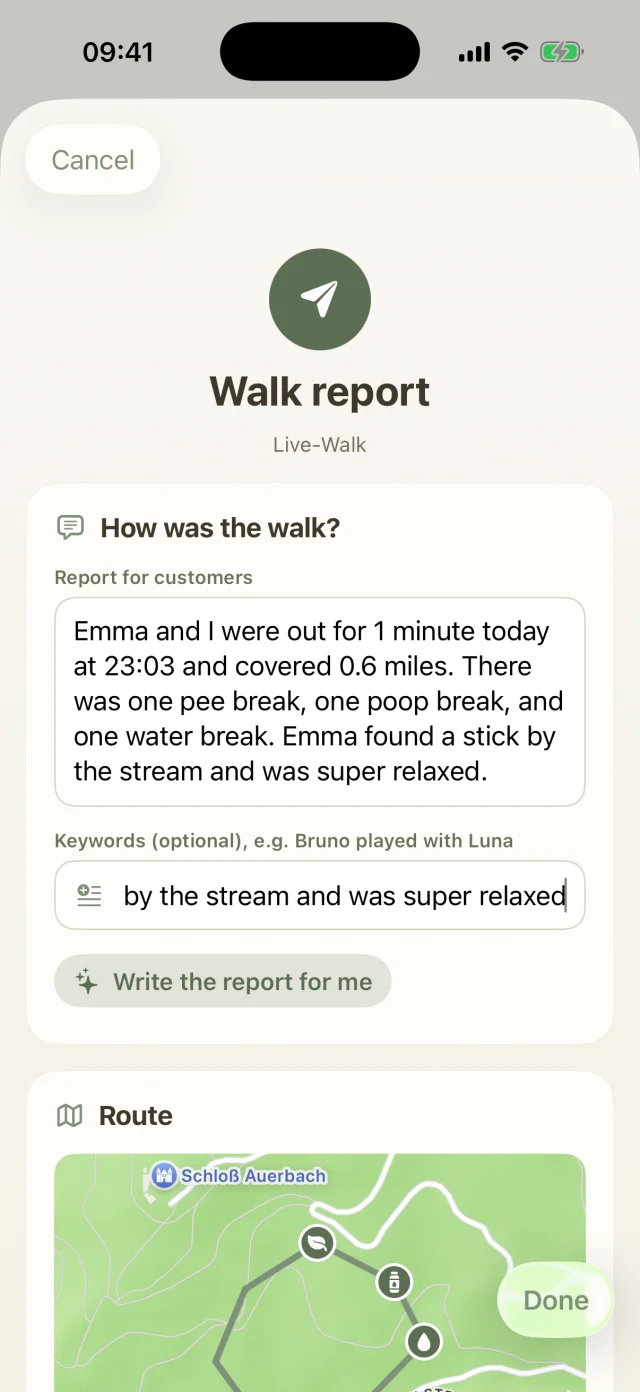
- Open the walk report, for example right after completing the walk.
- Type a few keywords under “How was the walk?”, such as “Bruno played with Luna”. That part is optional.
- Tap Write the report for me. Within seconds Apple Intelligence writes two to four warm sentences, with duration, distance, weather and all markers.
The app only writes what actually happened, and you can edit the text freely afterwards. If there's already text, it asks before replacing it.
What if my iPhone doesn't have Apple Intelligence?
Then the app inserts a ready-made text template built from the walk data and briefly tells you why. The same happens if Apple Intelligence is switched off, still downloading or doesn't support your language yet. You can edit the template just the same.
How do I send the report with photos?
With Add photos from the walk you pick the best shots, up to ten at a time. Then tap Save report & send by email and your mail app opens with the finished draft to the owners.
Can my customers rate a walk?
Yes. Owners give stars for the walk in the customer portal. With the next sync the ratings arrive in the app, and you'll see your average on the Today screen.
Invoices & payments
Bill, send friendly reminders and get paid. Most of it takes care of itself.
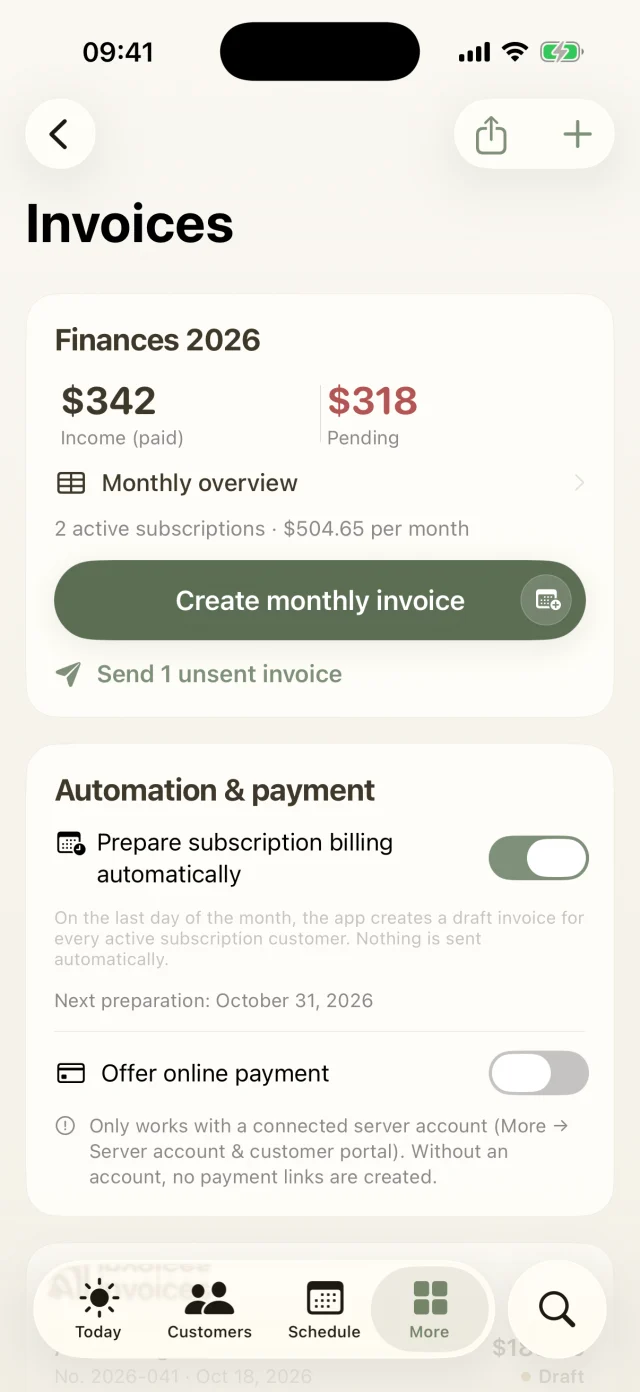
How do I create a monthly invoice?
- Open More → Invoices and tap Create monthly invoice. Pick the customer and month.
- The app gathers all completed walks of the month, including second-dog surcharges and pick-ups. Each walk is billed only once. You can adjust line items.
- The PDF carries your business details and a sequential number. Send it by email straight from the app or through the customer portal.
How does automatic subscription billing work?
- Under More → Invoices → Automation & payment, switch on Prepare subscription billing automatically. The app shows when the next run is due.
- On the last day of the month it creates a draft for every active subscription, with the subscription price, second dog and pick-up. This happens as soon as you open the app on that day or later.
- A banner shows you the new drafts. With Review & send you take a quick look and send them all at once.
Nothing is ever sent without you. Customers without a subscription price are skipped, and the app tells you why. The automation starts with the month in which you switch it on.
I sent the invoice myself. What now?
- If you printed it or used your own email, tap Mark as sent in the invoice.
- Only then do the payment term and reminder levels start, and the amount shows as open. A sent invoice can no longer be deleted, only cancelled.
- Once the money is in, tap Mark as paid.
How do payment reminders work? Pro and up
Dog Walkers reminds in three friendly steps: payment reminder, second reminder and last reminder.
- When an invoice is a week past its payment term, the Important list on your Today screen suggests the payment reminder.
- The second reminder follows 14 days later at the earliest, and the last reminder another 14 days after that.
- The texts are written for you, and you can adjust them before sending. Every step is recorded on the invoice.
How do I offer online payment?
- You need a connected server account. Then switch on Offer online payment under More → Invoices → Automation & payment.
- Tap Connect Stripe account. Stripe's setup opens in your browser. Once Stripe has checked your account, the app shows it as connected.
- From then on every invoice gets its own payment link. It's added automatically to the invoice email, payment reminders and the PDF. You can also copy or share it from the invoice.
Which payment methods are there, and what does it cost?
Your customers pay by card, Apple Pay or SEPA direct debit. The money goes straight to your own Stripe account. Dog Walkers doesn't charge a fee for this; only Stripe's usual fees apply.
Is an invoice paid online ticked off automatically?
Yes. Whenever you open your invoices or sync, the app checks for new payments. If amount and currency match, the invoice is marked as paid.
If something doesn't add up, such as a different amount, a duplicate payment or a payment on a cancelled invoice, you get a notice. Refunds are then handled in your Stripe dashboard.
If you mark an invoice as paid by hand, cancel it or delete it, its payment link stops working automatically. Credit notes and amounts under 0.50 don't get a payment link.
How do I cancel an invoice?
Open the invoice and tap Cancel / create credit note. The app creates a credit note for the full amount and marks the original invoice as cancelled, so your number sequence stays clean.
Can I send e-invoices? Pro and up
For businesses in Germany, Dog Walkers creates an XRechnung in addition to the PDF. You'll find it in the invoice under Generate e-invoice (XRechnung XML). The option appears when your iPhone's region is set to Germany.
How do I get my numbers for my accountant?
Under More → Invoices, the Monthly overview shows income and open amounts per month. Credit notes are deducted in the month they were created. With the share icon at the top you export all invoices of a year as a CSV file that opens straight in Excel or Numbers.
Team & business
Keys, staff, inquiries, the waitlist and your mileage log. For solo walkers and for the whole pack.
How do I manage keys?
You add keys in the customer profile via Edit. Under More → Keys you then see for every key whether it's stored, with the walker or returned. Taking and putting back are one tap each. The history shows every handover, and when you return a key to the customer the app drafts the email too. Keys to take along also show up in the morning's Important list.
Can I add staff? Business
Yes. Under More → Staff you add your team with name, email and role. The subscription keeps running through your Apple ID.
How do I see where there's room for new dogs?
More → Occupancy shows for the next seven days how many dogs are in each walk and how many spots you still have, measured against your maximum number of dogs per walk.
How do I keep track of inquiries? Business
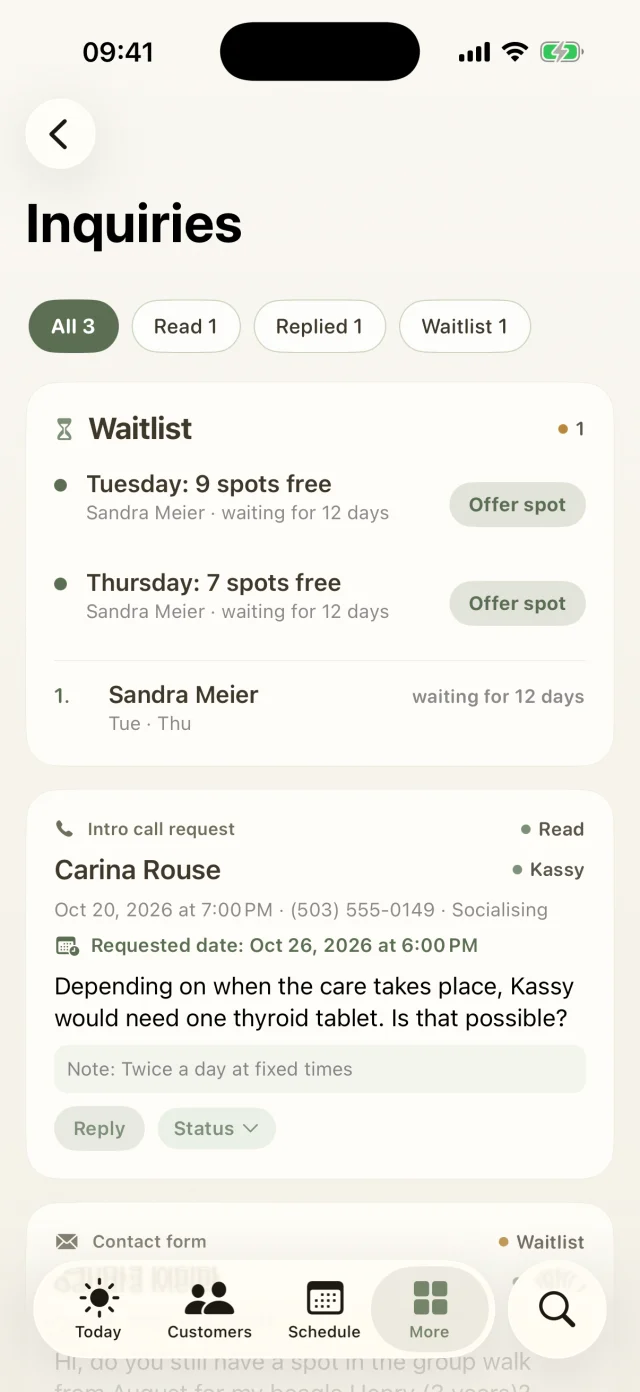
Under More → Inquiries you'll find every inquiry with name, contact, dog, message and your notes. Each has a status: new, read, replied, confirmed, declined, waitlist or archived. You reply straight from the app.
When it's a match, tap Convert to customer. The app carries name, email and message over into a new customer file, no retyping needed.
How does the waitlist work? Business
- When you're fully booked, put an inquiry on the waitlist and tick the Preferred days from Monday to Sunday.
- Whoever has waited longest is at the top, and you see how many days each person has been waiting.
- When a spot opens up in one of your regular groups, the app suggests who to offer it to. With Offer spot the email is already written.
How do I record an incident? Pro and up
In the Schedule tab, tap + and then Log incident, or start from the customer profile. You note date, dog and what happened, and whether the owners have been told. That way you're properly documented if questions come up later.
How do I keep my mileage log? Business
Under More → Vehicles you add your cars with name, licence plate and number of dog spots. In the Mileage log you enter each trip with date, vehicle, distance and purpose. The app keeps the total of your business mileage for you.
Subscription & account
Free trial, plans, cancelling, your server account and backups. All about you and your data.
How does the free trial work?
Every plan starts with 7 days free. You pick the plan in the app, confirm with your Apple ID and pay nothing for the first 7 days. During the trial the chosen plan is fully usable. Cancel at least 24 hours before the trial ends and nothing is charged. Otherwise the subscription continues at the chosen price.
How do I cancel?
Your subscription runs through your Apple ID. Cancel any time in iOS Settings → your name → Subscriptions → Dog Walkers. Cancellation takes effect at the end of the paid period; everything stays unlocked until then.
Can I switch plans?
Yes, any time from the same subscription page. An upgrade applies immediately, and Apple credits the remaining value of the old plan. A downgrade takes effect at the end of the current period. Your data is always kept. Features above the new plan are hidden, not deleted.
Where do I find the receipt for my subscription?
Apple issues the subscription receipt. You'll find it in iOS Settings → your name → Media & Purchases → View Account → Purchase History, or in the email Apple sends after each charge. Dog Walkers itself never sees your payment details.
I have a new iPhone. How do I take everything with me?
- Sign in with the same Apple ID and tap Restore purchases under More → Membership. Your subscription is active again.
- With a server account, bring your data back via More → Server account & customer portal → Restore from server (new device).
- Without a server account, import your latest backup via More → Settings → Data & backup → Import backup. A regular iPhone backup through iCloud or the Finder also includes the app data.
Why would I need a server account?
Without a server account everything stays on your iPhone, and the app works just fine. You only need the account for features where your customers join in or the app sends things for you: the customer portal, the live link, online payment, email from the app and syncing between devices.
Create one under More → Server account & customer portal with Register, or Sign in to an existing one.
What does “Sync now” do?
More → Server account & customer portal → Sync now syncs in both directions: your customers, appointments and invoices go to the customer portal, and everything your customers filled in online (intake form, package booking, signature, reviews) comes back into the app.
How do I back up my data?
- Open More → Settings → Data & backup and tap Create backup (JSON).
- With Share backup you save the file to iCloud Drive or Files, or email it to yourself.
- To restore, choose Import backup. Careful: Import & replace overwrites your current data completely.
With a server account your data can also be restored via Restore from server (new device).
Do prices include tax, and are there discounts?
All prices include VAT where applicable and are the same amount in every supported currency, for example $29.99, €29.99 or £29.99. Paying yearly gets you two months free. Clubs and shelters: please get in touch via Support.
Privacy & security
Your data and your customers' data are safest with you. Here's how Dog Walkers protects them.
Where is my data stored?
On your iPhone, in the protected app container and encrypted by iOS. Without a server account it only leaves your device when you share something yourself, such as a backup or a PDF. For syncing and the customer portal you can choose to connect a server account. All the details are in our Privacy Policy.
Who is responsible for my customers' data?
You are. For your customers' data you're the controller (or, under Canadian and US law, the business responsible for it). If you use a server account, Cogswell IT processes this data solely on your behalf. A data processing agreement is available on request; see the Privacy Policy.
What happens to my notes in the AI walk report?
The report is written with Apple Intelligence right on your iPhone. Your keywords are not sent to us or to any other server. If your device doesn't have Apple Intelligence, the app inserts a ready-made template built from the walk data.
Who can see my location during a live walk?
Only people you send the live link to, and only while the walk is running. Your location is shared exclusively during a running live walk. As soon as you end it, the link shows nothing anymore.
Can I protect the app from prying eyes?
Yes. Under More → Settings → Security switch on Lock app with Face ID. The app then locks whenever you leave it and opens again with Face ID, Touch ID or your device passcode.
Are there ads or tracking?
No. Neither the app nor this website contains advertising, analytics or tracking SDKs, third-party cookies or fingerprinting.
Where do my photos stay?
The app stores photos on your iPhone. They only leave it when you send them yourself, for example with a walk report.
What's in a diagnostic report?
Under More → Help & support you can create a diagnostic report or report a bug with diagnostic data. It contains technical details such as the app and iOS version and the app log, but no customer data. For bug reports it's the quickest way to a fix.
How do I delete my data?
More → Settings → Data & backup → Delete all data removes customers, appointments, invoices and bookings from your iPhone. Your business details are kept. If you'd also like your server account deleted, drop us a line and we'll take care of it.
We don't have an answer for that yet.
Try a different word, like “invoice”, “contract” or “backup”. Or write to us and we'll help you personally.
Still curious? Just drop us a line.
Dog Walkers is made by a small team of dog lovers. A real person answers every message, usually on the same day.
Your pack
is waiting.
Try Dog Walkers free for a whole week. We're pretty sure you won't want to go back. And if you do, cancelling takes two taps.